SQL Server health checks
A structured review of your SQL Server estate, with findings explained in plain English and a prioritised improvement plan.
- Configuration and capacity review
- Backup, job and integrity checks
- Performance and resilience risks
Optimising SQL Server performance, one query at a time.
Practical database expertise for businesses that depend on SQL Server. From a focused health check to ongoing remote DBA support, DBTECH helps you understand the risks and make the right improvements.
25+ years of hands-on experience · Based in Sheffield · Remote delivery
Address an immediate issue, plan your next migration or put dependable database support in place. Each engagement starts with your systems, priorities and business requirements.
A structured review of your SQL Server estate, with findings explained in plain English and a prioritised improvement plan.
Investigate slow queries, blocking and resource pressure. Focus changes on the bottlenecks that affect your applications.
Plan and deliver a move that fits your workload, from SQL Server version upgrades to Azure SQL and Azure virtual machines.
Build your recovery approach around how much downtime and data loss your business can tolerate.
Ongoing SQL Server expertise without a full-time hire. Agree the scope, support hours and responsibilities around your needs.
Extend your managed services offering with specialist SQL Server support for client projects and technical escalations.
When a client needs deeper database expertise, DBTECH can work alongside your team. Agree the delivery model, communication and responsibilities before work begins.
Start a partner conversation ↗Discuss the environment, symptoms and business impact. Agree access requirements and a scope before work starts.
Investigate the cause, explain the options and agree changes. Plan validation and rollback around your operating requirements.
Document findings and changes, share recommendations and agree any follow-up support your team needs.
DBTECH Solutions Ltd was founded by Richard Morrison in November 2011. Richard brings more than 25 years of SQL Server DBA and development experience across public and private sector environments.
Work directly with a consultant who understands database administration, query performance, data integration and the operational demands behind them.
Richard’s professional experience includes work with Hiscox, the NHS, Pearson, Royal Mail, British Gas, Unilever, Bet365 and Yorcard. These references describe professional experience, not endorsements or current client relationships.
SQL Server · T-SQL · AlwaysOn · SSIS · SSRS · SSAS · Azure
Tell us what you’re working on, what’s causing concern and the timescale you have in mind. We can then discuss a suitable next step.
rich@dbtech-solutions.comConnect with Richard on LinkedIn ↗
For MSP enquiries, include the type of support you need and whether the requirement is project-based or ongoing.
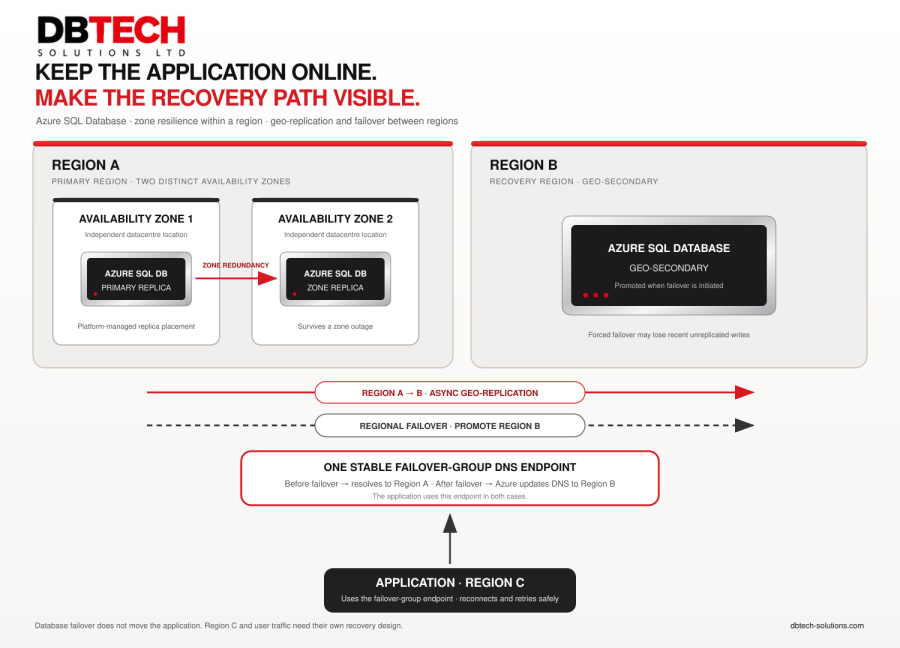
A database can recover while customers still cannot complete a transaction. Database failover changes which database accepts writes. It does not automatically move the application, restore user traffic or prove that the business service is back.
High availability (HA) reduces interruption from failures within a defined design. Disaster recovery (DR) addresses more severe disruption, such as a regional outage. Azure SQL Database can be configured for both, but the protection depends on the service tier, region and settings you actually use.
Availability Zones are separate groups of datacentres within an Azure region. With zone redundancy enabled on a supported Azure SQL Database configuration, Azure manages the database response to a zone outage. Requests in progress may be interrupted, so the application still needs to handle transient connection errors and retry safely. It does not need to select Zone 1 or Zone 2 itself. [1]
A zone outage and a region outage are different events. Zone redundancy within Region A does not, on its own, provide a database in another region.
To recover from a regional outage, configure a geo-secondary in another region, such as Region B, and place the databases in a failover group. Azure replicates changes to the secondary asynchronously. If a forced failover is required, recent transactions may not yet have reached Region B and could be lost. [2]
The failover group provides a stable read-write connection name. The application should use this failover-group endpoint rather than a server-specific address. The endpoint uses the Domain Name System (DNS); after the database roles change, Azure updates its resolution to the new primary. [2]
Existing sessions can still break during a failover. The application must reconnect, retry transient failures with suitable backoff, and avoid blindly repeating a business operation when it is uncertain whether the first attempt committed.
In this example, the application runs in Region C, separate from the primary database in Region A and the geo-secondary in Region B. If Region A fails, the application in C may keep running while Azure promotes the database in B and redirects the failover-group endpoint.
That only restores the database connection path. The application, its identity, network access, secrets and other dependencies must also work in Region C. Users need a route to the application, and Region C needs enough capacity for the workload. If the application exists only in Region A, moving the database will not bring the complete service back. [3]
A planned failover drill lets the primary and secondary synchronise before switching roles. Use it to test the full journey: a user reaches the application, signs in, completes a representative transaction, and can read the resulting data. Then test the planned return to the original region. [4]
Set recovery targets around the business outcome. The Recovery Time Objective (RTO) is the target time to restore the required service. The Recovery Point Objective (RPO) is the maximum data loss the business is prepared to accept, expressed as time. Measure when customers can complete the transaction again—not only when the database becomes primary.
At your next recovery review, ask: if Region A became unavailable, could users still complete a transaction—and have you proved it?
DBTECH Solutions Ltd can help review SQL Server and Azure recovery designs and test them against business requirements.
#DBTSMonitor
 Print
Print